
I had another pair of experiences with Google’s Gemini AI assistant this week.
One was a resounding success, although not without a few minor errors.
The other was a grand example of an AI hallucination, a total FAIL in what should have been a straightforward task.
Today, I’ll describe Gemini’s assistance in understanding the wiring that brings Hawaiian Telcom’s fiber optic cable into our home, prompted by a “FINAL NOTICE” warning that we’ll lose our current tv service as the company moves to a new digital platform that they call Fioptics. And I’ll save Gemini’s hallucination for a future post.
We’ve been on an older system installed over a decade ago that relied on an old-fashioned cable box, although we updated to fiber optic cable when it became available in Kahala after moving back to what had been my parents house back in 2015. A very good tech caught our assignment at that time and was able to bring the fiber into our attic crawlspace, then through an interior wall into a shelf high in the closet in our small spare bedroom. During remodeling, we had phone jacks and internet connectors hardwired in a few key places in the house, and our fiber installation included equipment to “back feed” the signal from the fiber input back to the existing wall jacks. The result was, from my perspective, an unruly jumble of wiring involving four digital devices up on that shelf.
At least five years ago, I added an Eero wifi router, which I managed to get up and running as a wifi network parallel to, and faster than, the Hawaiian Tel network. It took lots of trial and error along the way, with more errors than I can count. But eventually I got it working, and it’s been sitting up there in the closet all that time doing its thing.
Now we come to the new Fioptics+ system, which does away with the old cable box and replaces it with a customized TiVo, also adding an updated Eero, newer than the one I had previously installed. In the self-installation instructions, the Eero becomes the primary gateway to the house and all our connected gadgets.
Two issues immediately arose. First, we use an Apple TV and have no desire to switch to TiVo. Although I explained this to the customer service rep I spoke with at Hawaiian Tel, they sent us the TiVo anyway. However, I did find basic confirmation that an Apple TV can be used in place of the company provided TiVo, with Fioptics loaded as an app onto the Apple TV.
First problem solved. Then I quickly found that none of the photos, diagrams, or instructions provided by Hawaiian Tel looked like our complicated set-up.
I plunged ahead even before the box with the new equipment arrived from Hawaiian Tel. I loaded up the Fioptics app, checked that it was working, then unplugged the cable boxes which, according to the online instructions, was to be discarded as ewaste.
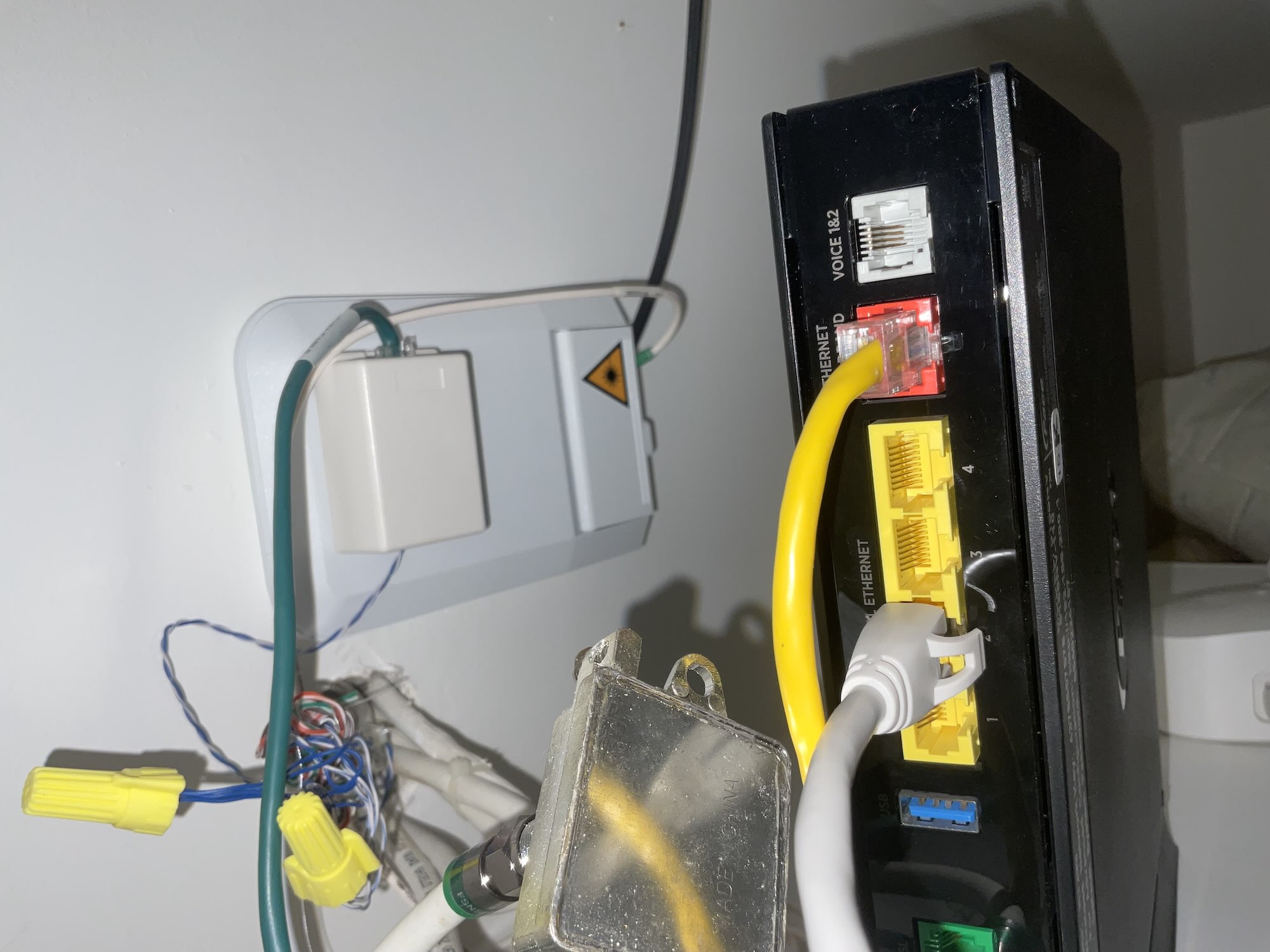 But I was stumped trying to decipher how our system was wired, and whether it would cause a problem when the proverbial switch is going to be thrown on Friday evening and we’re suddenly tossed into the new digital world.
Hawaiian Telcom’s instructions were endlessly frustrating as they didn’t cover a situation like ours.
So sort of in desperation, I turned to Gemini for help, beginning by uploading a photo of our cable installation and asking Gemini to explain what it shows.
Gemini immediately identified it as “a typical Fiber-to-the-Home (FTTH) setup, where the incoming optical fiber from your service provider is converted into an internet signal for your home devices.”
The small white wall-mounted device is the Optical Network Terminal, Gemini explained, “the most critical piece of hardware in a fiber installation.”
In this photo, the black wire coming into the Optical Network Terminal is the fiber that carries the signal into the house.
Gemini then explained the other things seen in the photo.
Residential Gateway
The black device on the right is your main router (often called a gateway).
WAN Port (Red): The yellow Ethernet cable connects the ONT (where the internet comes in) to the red Broadband/WAN port on this device. This provides the “source” of the internet to the rest of the house.
LAN Ports (Yellow): The four yellow ports are for your local devices. You can see a white Ethernet cable plugged into one, which likely leads to a computer, a gaming console, or a mesh Wi-Fi extender elsewhere in your home.
Wiring and Connectors
Coaxial Splitter: The silver metal piece in the foreground is a Coaxial Splitter. This is usually left over from a previous cable TV/internet setup. If you aren’t using cable TV boxes, this might not be doing much in your current fiber setup.
Wire Nuts (Yellow caps): These are being used to “splice” or join copper telephone wires. This suggests your fiber installer may have back-fed the fiber phone signal into your home’s existing wall phone jacks.
Cat5e/6 Cabling: The bundle of blue, green, and white wires coming out of the wall are standard data cables used to wire different rooms in the house for internet or phone.
Gemini got a few details wrong, but I think that could have largely been avoided if I had uploaded a photo of the full installation, showing all of the devices, Gemini could have figured it out and provided a more accurate explanation of how the system works.
But it explained enough that I’m now pretty confident that when we are officially switched over to Fioptics at 6 p.m. today (Friday), it’s going to work without further changes to our setup.
My fingers are crossed.
And, for the record, Hawaiian Tel is refunding the cost of the TiVo and removing its monthly charge from our bill. And despite the earlier instructions from the company, the new equipment arrived in a box along with a prepaid FedEx label to be used to return the old cable box (instead of discarding it as ewaste).
Discover more from i L i n d
Subscribe to get the latest posts sent to your email.