Category Archives: Computers

PGA tournament data system catches my eye

The Sony Open, one of the first PGA tournaments of the year, officially gets underway Thursday at the Waialae Golf Course, just around the corner from our house.

Things get very busy in the neighborhood, and on the golf course, in week or two before the tournament, as tents, stages, grandstands, and camera towers are put together in various parts of the course, and miles of fiber optic and power cables are laid in place around the course.

I took this photo a couple of days ago showing the cables running along what during the tournament is the 17th hole, which runs parallel to the beach. The cables appeared to be running to a television camera tower overlooking the 16th green.

On the other end, it seemed that some or all plugged into a black case that sat under a temporary pole, perhaps 10′ high, with some sort of gizmo at the top. I was curious, and took a photo of the case, which was marked “PGA Tour Shotlink.”

So when I got back home, I looked up PGA Tour Shotlink, which turns out to be an amazing data system that is temporarily installed on the course for each PGA tournament, and makes possible instant data sharing of a tremendous amount of cloud-based data.

The PGA TOUR’S ShotLink technology, powered by CDW, has tracked and recorded every professional golf shot in real time since 2001, delivering insights to fans watching at home or following tournaments through mobile apps, and providing critical data to
players striving to improve their performance.

I was just shaking my head at the complexity of this portable system, but a friend made an obvious comment: “Imagine what a system like this can do tracking demonstrators or marchers or any other public gathering or in any public space.”

It’ a whole new world.

What an email account can reveal….

One of the search warrants described in my Civil Beat story yesterday was addressed to Google and requested “information associated with” a Gmail account.

It turns out that a request of this kind has a much wider reach than most people expect. Emails sent and received are just the starting point.

Although the warrant in question is sealed, I took a look at what appears to be a similar request, a search warrant application filed on February 13, 2017, sought records associated with the account for gingerbreadjr3351@gmail.com, used by Lance Bermudez, known as “Hammah,” one of the Miske defendants who pleaded guilty in September.

The case file containing the warrant application, affidavit, and related documents, case number 17-MJ-00161, was unsealed by Watson’s court order dated September 23, 2022.

It was supported by a 48-page affidavit signed by FBI Special Agent Austin Jackson, and an attachment detailing the types of information the search warrant sought from Google.

The scope of information sought by this search warrant, described in “Attachment B,” is surprisingly broad, and is a reminder of how much information internet service providers collect and maintain on every user.

Information sought by the Bermudez warrant began with all emails stored in the account, whether sent to or from the account, including draft emails, “the source and destination addresses associated with each email, the date and time at which each email was sent, and the size and length of each email.”

That was just the beginning.

It then asked for all information about the identification of the account, including the name, physical address, telephone numbers used in creating the account, along with the date the account was created, length of service, types of services utilized, the IP address used to register the account, the log-in IP addresses associated with individual sessions and dates, any alternate email addresses provided, log files, and sources, including credit or bank account numbers, used to make payments.

The list goes on. Next came all information stored by the person using the account, including address books, contact lists, pictures and files stored on Google Drive and Google Photo, as well as information on additional accounts linked by “cookies,” those small files left by websites visited that can track the site, and the viewer, over time.

And there was one final but very important type of information, “location history,” described as “all location data whether derived from Global Positioning System (GPS) data, cell site/cell tower triangulation precision measurement information such as timing advance or per call measurement data, and Wi-Fi location….”

Knowing how, when, and where the email account was accessed could then be used “to determine the geographic and chronological context of account access, use, and events relating to the crime under investigation and to the email account owner….” as well as “indicating the email account owner’s state of mind as it relates to the crimes under investigation,” according to Agent Jackson’s submission.

Further, information maintained by the email
provider can show how and when the account was accessed or used.
For example, as described below, email providers typically log
the Internet Protocol (IP) addresses from which users access the
email account, along with the time and date of that access. By
determining the physical location associated with the logged IP
addresses, investigators can understand the chronological and
geographic context of the email account access and use relating
to the crime under investigation. This geographic and timeline
information may tend to either inculpate or exculpate the
account owner. Additionally, information stored at the user’s
account may further indicate the geographic location of the
account user at a particular time (e.g., location information
integrated into an image or video sent via email). Last, stored
electronic data may provide relevant insight into the email
account owner’s state of mind as it relates to the offense under
investigation. For example, information in the email account
may indicate the owner’s motive and intent to commit a crime
(e.g., communications relating to the crime) or consciousness
of guilt (e.g., deleting communications in an effort to conceal
them from law enforcement).

Amazon announces the end of its free document storage

Bad news this week. Amazon is shutting down “Amazon Drive,” the unlimited document and photo storage service it offered as free service to Amazon Prime membershear.

I made considerable use of it when we moved from Kaaawa, and archived thousands of pages of documents, along with tens of thousands of photos and video.

Amazon says the photos are safe, having been automatically transferred to its Amazon Photos service. But documents are a different story. The company has provided lots of advance warning, and all the documents will be available to download and transfer elsewhere until the end of 2023.

But trying to find and download all kinds of documents is going to be grueling and a challenge. And the archived documents include old tax records and financial records, including those necessary for figuring out the cost basis of old investments.

Of course, I fear procrastinating and finding myself late next year scrambling to get it done at the last minute. Isn’t that the way of the world?

Putting a little zip into our home internet

My latest purchase arrived yesterday. I had been swayed by the hype after reading through the ads and reviews of Eero, a small and easily installed wifi router that supposedly dramatically improves the internet speeds delivered by your broadband provider.

Hawaiian Telcom’s fiber optics bring the internet into our house. I always thought it was fine in everyday use. But that was before the pandemic and the ubiquitous Zoom meetings, webinars, and conversations. Suddenly, the little hiccups and stutters have been obvious, and were bothering me.

So, swayed by the ads, I ordered a new Eero Pro 6. They would like to sell you a three-pack to speed up things throughout a large house. But they also provide a “calculator” that recommends the right system for you based on the size and shape of your house and the number of devices to be connected. Our house is small, and their recommendation was that a single Eero would do the trick. So that’s what I ordered.

Now to find out if it really delivered.

I finally opened the box yesterday afternoon. The first problem. The Hawaiian Tel fiber comes from outside into our attic crawlspace, then down on a high shelf in our spare bedroom, now known as Kali’s room. There’s a whole nest of wires and boxes of unknown function up there, and it wasn’t exactly clear to me how to find and replace the Hawaiian Tel supplied router with the Eero. The photos I found from Hawaiian Telcom seemed straight forward, except they were for a broadband installation only. Our fiber comes in and delivers regular internet, and also television, making it more complicated.

I had thought that perhaps I could just take the cable coming out of what I think is the cable modem, and plug that into Eero. But I realized that disconnected the next gizmo (the router?) in the Hawaiian Tel series would probably disrupt our television service, which also connected to it. After thinking about it, I decided that I could wait and call Hawaiian Tel for advice, hoping for an elegant solution, or I could just set up a second, Eero wifi network running alongside the Hawaiian Tel wifi. I figured that would at least give me an idea whether it really works, or whether it deserved to be boxed up and returned for a refund.

So I left all of the Hawaiian Tel stuff in place, and simply plugged another ethernet cable into what I think is their router, plugged the other end in the Eero, then fired it up. Set-up is via a smartphone app. And from there it was simple. Give your network a name and password. Wait for the Eero to connect. Enter the code received from Eero in a text message. And, if I’m not mistaken, that was about all.

Bingo. Now the Hawaiian Tel wifi network and my new Eero network appeared. Both worked. But was Eero really faster?

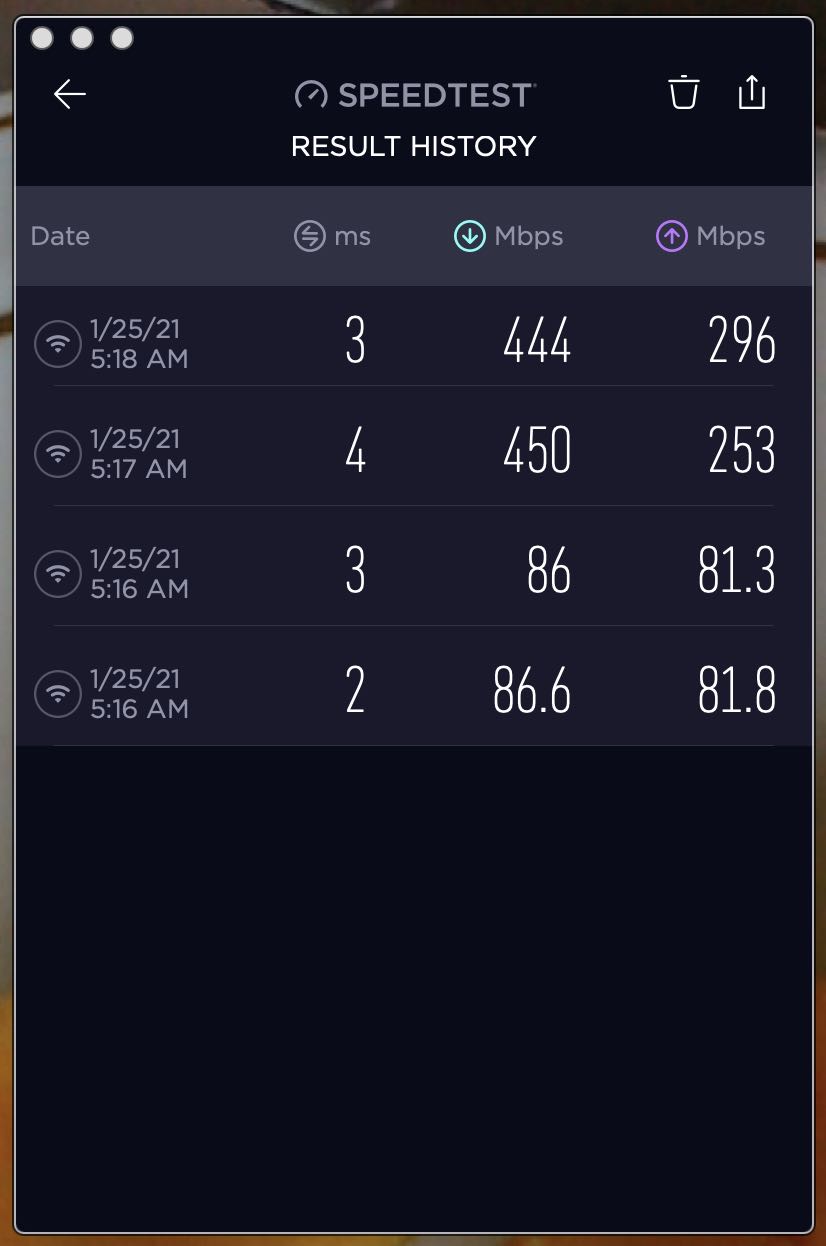
So I loaded up the speed test app by Ookla. The difference between the two networks was dramatic.

Early this morning, I ran the tests again on my Macbook Pro 16″. Twice. Here are the results for download and upload speeds. The slower results were using the Hawaiian Tel network. The faster results are Eero. Both use exactly the same internet connection via the fiber optic cable, but convert it to wifi differently. And what a difference.

Check it out. Download speeds are 5x faster, upload speeds over 3x faster. Realize that it is not optimized by any means. Would it be faster if it replaced rather than ran alongside the Hawaiian Tel wifi? I don’t know. I can say, though, that it is near the top rated speed of our Hawaiian Tel 500 Mbps internet plan. Is it capable of even more speed with a higher speed plan? Eero says it is.

For now, though, I’m perfectly content with the faster speeds and simplicity of setup.