
My latest purchase arrived yesterday. I had been swayed by the hype after reading through the ads and reviews of Eero, a small and easily installed wifi router that supposedly dramatically improves the internet speeds delivered by your broadband provider.
Hawaiian Telcom’s fiber optics bring the internet into our house. I always thought it was fine in everyday use. But that was before the pandemic and the ubiquitous Zoom meetings, webinars, and conversations. Suddenly, the little hiccups and stutters have been obvious, and were bothering me.
So, swayed by the ads, I ordered a new Eero Pro 6. They would like to sell you a three-pack to speed up things throughout a large house. But they also provide a “calculator” that recommends the right system for you based on the size and shape of your house and the number of devices to be connected. Our house is small, and their recommendation was that a single Eero would do the trick. So that’s what I ordered.
Now to find out if it really delivered.
I finally opened the box yesterday afternoon. The first problem. The Hawaiian Tel fiber comes from outside into our attic crawlspace, then down on a high shelf in our spare bedroom, now known as Kali’s room. There’s a whole nest of wires and boxes of unknown function up there, and it wasn’t exactly clear to me how to find and replace the Hawaiian Tel supplied router with the Eero. The photos I found from Hawaiian Telcom seemed straight forward, except they were for a broadband installation only. Our fiber comes in and delivers regular internet, and also television, making it more complicated.
I had thought that perhaps I could just take the cable coming out of what I think is the cable modem, and plug that into Eero. But I realized that disconnected the next gizmo (the router?) in the Hawaiian Tel series would probably disrupt our television service, which also connected to it. After thinking about it, I decided that I could wait and call Hawaiian Tel for advice, hoping for an elegant solution, or I could just set up a second, Eero wifi network running alongside the Hawaiian Tel wifi. I figured that would at least give me an idea whether it really works, or whether it deserved to be boxed up and returned for a refund.
So I left all of the Hawaiian Tel stuff in place, and simply plugged another ethernet cable into what I think is their router, plugged the other end in the Eero, then fired it up. Set-up is via a smartphone app. And from there it was simple. Give your network a name and password. Wait for the Eero to connect. Enter the code received from Eero in a text message. And, if I’m not mistaken, that was about all.
Bingo. Now the Hawaiian Tel wifi network and my new Eero network appeared. Both worked. But was Eero really faster?
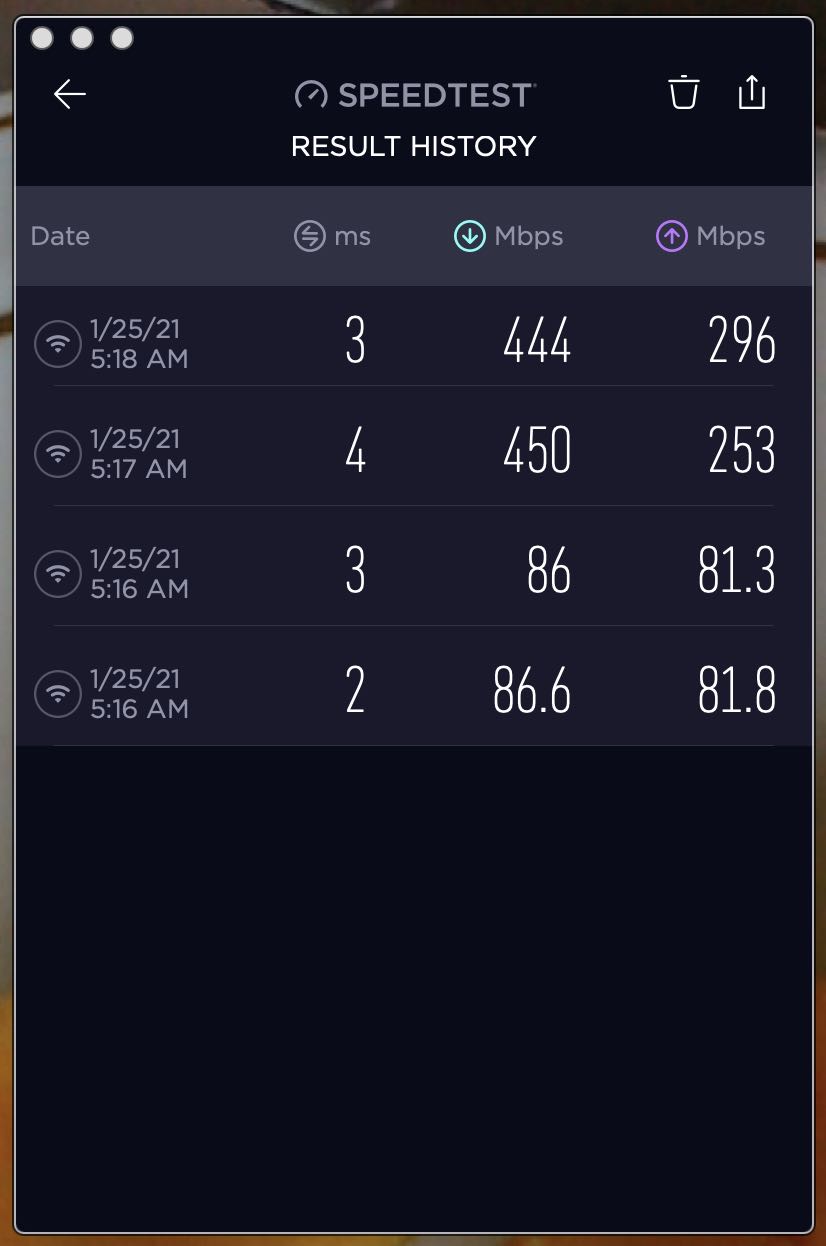
So I loaded up the speed test app by Ookla. The difference between the two networks was dramatic.
Early this morning, I ran the tests again on my Macbook Pro 16″. Twice. Here are the results for download and upload speeds. The slower results were using the Hawaiian Tel network. The faster results are Eero. Both use exactly the same internet connection via the fiber optic cable, but convert it to wifi differently. And what a difference.
Check it out. Download speeds are 5x faster, upload speeds over 3x faster. Realize that it is not optimized by any means. Would it be faster if it replaced rather than ran alongside the Hawaiian Tel wifi? I don’t know. I can say, though, that it is near the top rated speed of our Hawaiian Tel 500 Mbps internet plan. Is it capable of even more speed with a higher speed plan? Eero says it is.
For now, though, I’m perfectly content with the faster speeds and simplicity of setup.
Discover more from i L i n d
Subscribe to get the latest posts sent to your email.
I’ve rare problems w/Spectrum and ok w/speed, thio it’s 1/2 the rated bandwidth. I might give this a go. Think it was a good accident to tandem the routers ++.
I have been fascinated and perplexed by the step-down in Wifi Speeds for various routers. Job well done Ian and thank you for finding something that works. My latest Hi Tel supplied ZYXEL router is decent if close to it so boosting the dead spots with another router is required. The Netgear AC1900 WiFi Access Point worked for me. Now I want to test the Eero Pro 6.
I’ve been using eero Pro routers for about 2 years and I am nothing but happy with them. Setup is a snap, and they’re fast, and they’re stable. What else could you ask for?
Just to bookend this. I get Spectrum xtra fast internet at 200 mbs for which I pay an xtra $20. It periodically slows down.Thus an intruder broke our lanai window and our security cams (connected to the WiFi) showed nothing.
I’m always curious why people think they need faster and faster internet speed if they are not doing minute-by-minute market trading.
Isn’t a 3-5 second download fast enough for general use?
Some homes have the WiFi router running several systems all at once.
Samsung TV sets use the WiFi router to get Amazon movies, YouTube, Ring security camera also uses the router as does the updated garage door opener.
Alarm systems also use the WiFi router.
Great insight on mesh wifi systems. Thank you, Ian.
Seems to be popular. I shared this with a religious organization of your acquaintance that uses wi-fi and the internet a lot right now. Turned out Eero had already been installed and was working well throughout the place.
Thank you for posting this, I also have Hawaiian Telcom and was so confused trying to set this up. I followed your instructions and it worked like a charm! Thanks a million!