Category Archives: Consumer issues

Honolulu is also losing 20-somethings

The San Francisco Chronicle has a feature story today trying to decipher why young adults are leaving the city (“Why 20-somethings are abandoning San Francisco — even when they can afford it“). There may be a pay wall, but I’m not sure.

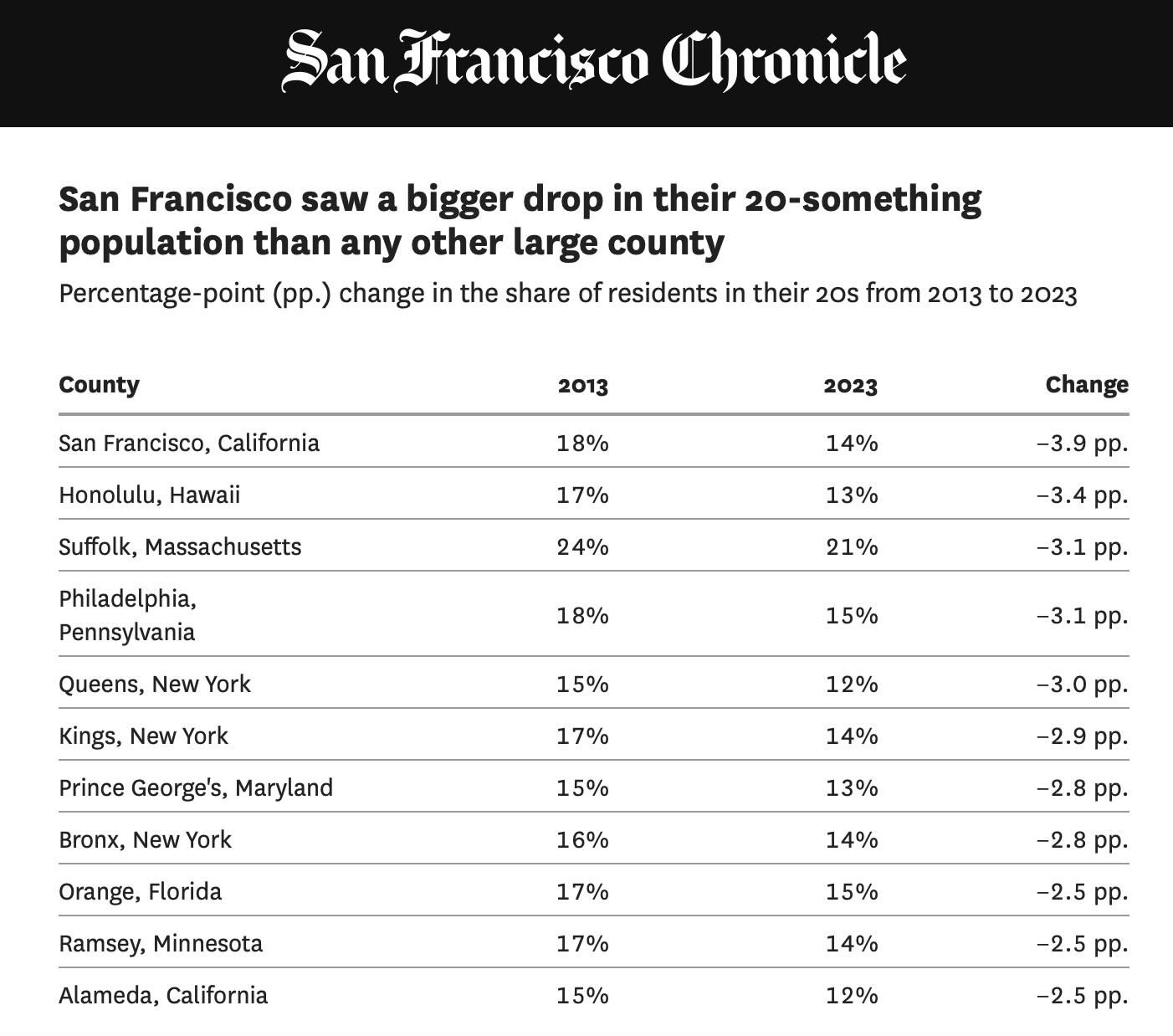
Overall, from 2013 to 2023, the share of 20-somethings in San Francisco County dropped from about 18% of the population to about 14% — the largest such decline of any major U.S. county and nearly quadruple the national drop. The data prompts a big question relating to the city’s economic future: Is this the mere ebbs and flows of San Francisco’s demographics at play, or the start of something much grimmer?

Here’s the relevance to us here in Honolulu. The article includes a table showing the decline in the 20-something population across 11 cities, with San Francisco at the top of the list with the greatest decline.

But second on the list, only slightly below SF, is Honolulu.

It appears we have a similar problem.

Looking back to 1937

My dad landed a job with Dorhmann Hotel Supply Company, a San Franisco-based company, in 1933. He wasn’t long out of high school. It was during the depths of the Great Depression, and jobs were in short supply. He was lucky to get hired as a stock clerk in Dohrmann’s Los Angeles store.

He then snagged a position as a delivery driver, and through a lucky break got into sales by volunteering to fill-in for a regular salesman who was going on vacation. He proved to be a good salesman, and the company promoted him. He did whatever he could to get ahead, and credited the Junior Chamber of Commerce and Toastmasters with providing new skills, confidence, and contacts which, along with his hard work, paid many dividends.

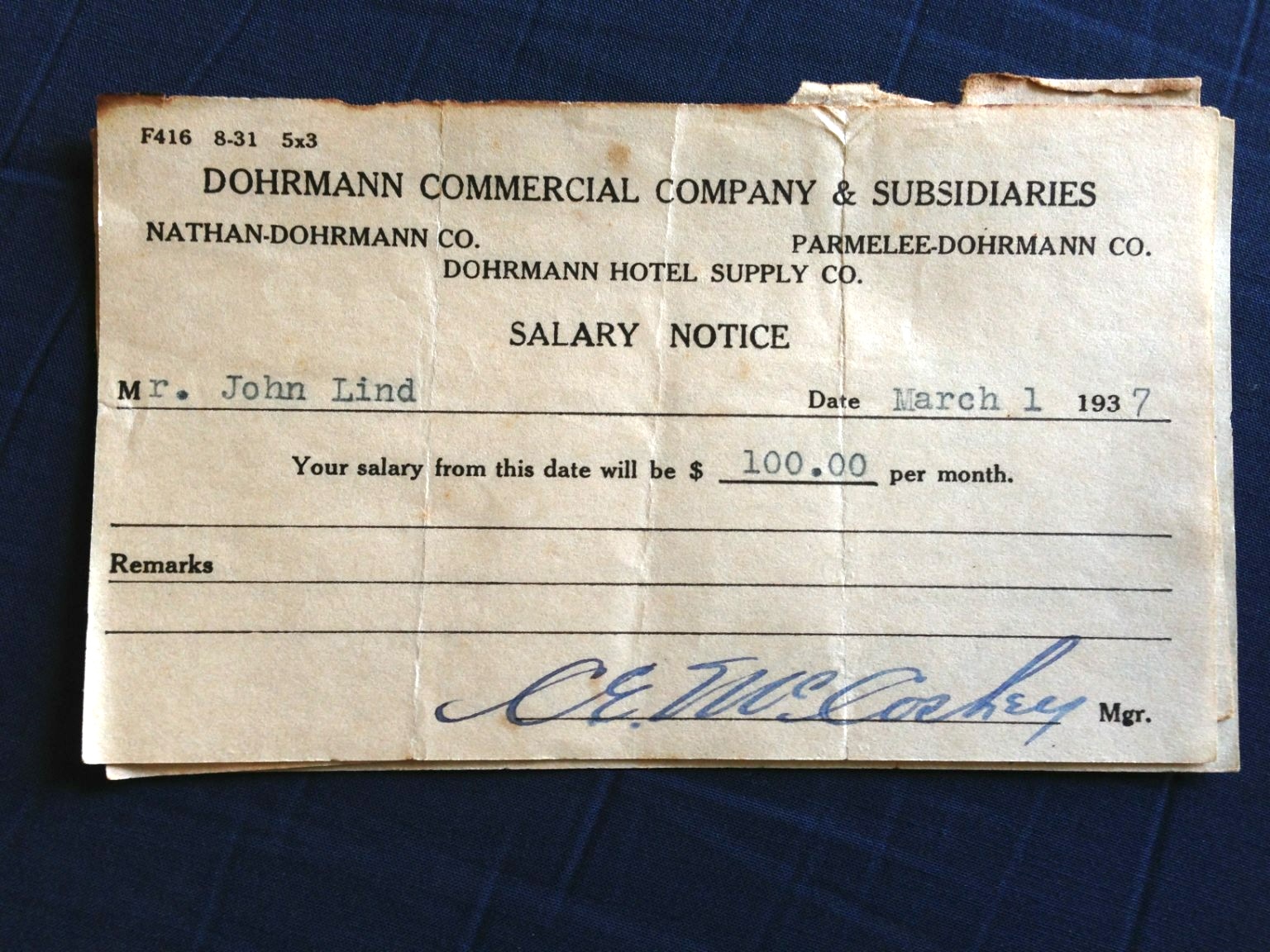
So when he received this salary notice, he had been working for Dohrmann for four years and was already a salesman. And all that work earned him $100 a month.

I wondered what food prices were like in 1937, and AI returned this answer. I guess $100 went a whole lot farther than it does today!

In Los Angeles in 1937, common food items were significantly cheaper than they are today. For example, a pound of hamburger cost 12 cents, a loaf of bread 9 cents, and a dozen eggs 45 cents. Other examples include:

Bacon: 18 cents per pound.
Sirloin Steak: 39 cents for 2 lbs.
Butter: 37 cents per pound.
Eggs: 45 cents per dozen.
Milk: 10 cents per gallon.
Potatoes: 10 cents for 3 lbs.
Sweet Potatoes: 10 cents for 6 lbs.

These prices reflect the economic conditions of the Great Depression, when food prices were generally low.

An easy transition to a new computer

I picked up my new 15″ M4 MacBook Air at the Kahala Apple Store yesterday afternoon. It had arrived a week earlier than expected. I ordered it amidst all the China tariff turmoil, putting to an end a long year of procrastination. Both the prospect of future price increases, and the stable trade-in value of the computer I’ve been using for the past 4 years, provided just enough of a boost to overcome my consumer hesitation.

I had last upgraded my everyday computer in 2021 when Apple introduced its first generation chip (M1) packaged in a MacPook Pro. It has been a very good computer, but with Apple’s chips already in for 4th generation, it seemed like a good time to make the upgrade move.

And this time around, I stepped down from the Pro line to a 15″ M4 MacBook Air. The Pro model now seems like overkill for my everyday uses. This Air will probably be plenty fast for everything I do, faster in most tasks than the Pro that it is replacing, and at a much more reasonable cost.

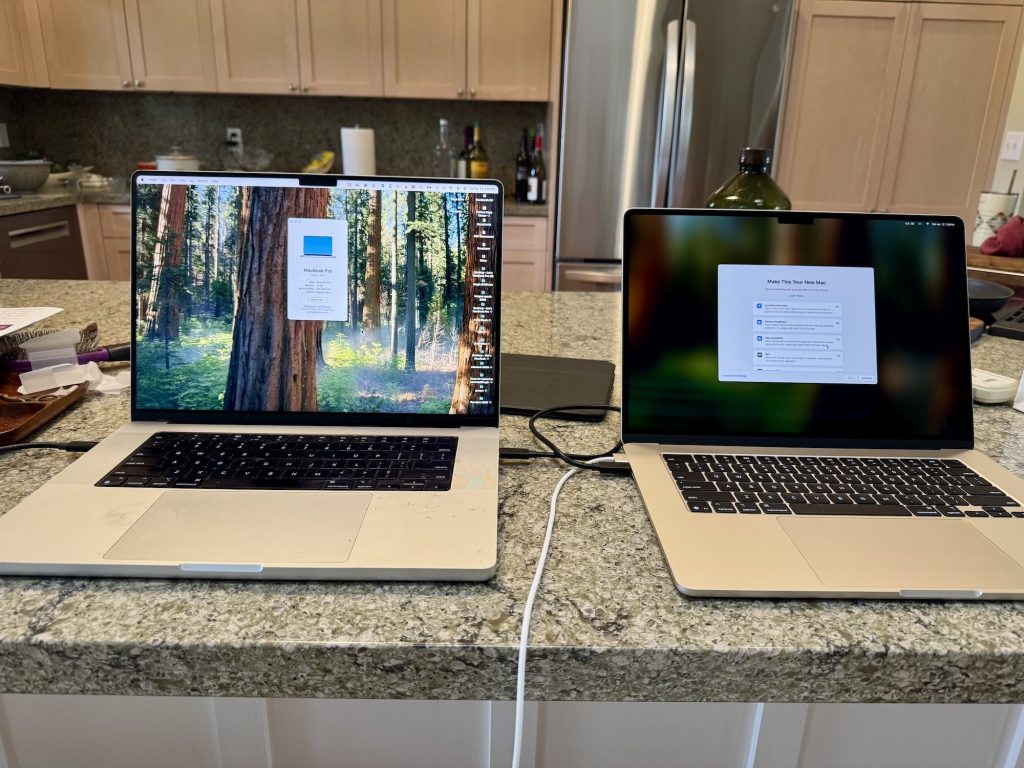
When I first opened it and removed the Air from the box, the 15″ screen seemed as big as the 16″ Pro that I’ve gotten accustomed to. It isn’t, of course, which becomes obvious when the two computers were set up side by side. But without the direct comparison, the screen on this MacBook Air is certainly big enough. I don’t feel like I’ve given up much at all.

Apple makes the whole process simple. I ordered online and was given an expected delivery date. To avoid problems, I chose to have it delivered to the Apple Store in Kahala Mall, where I could then pick it up.

Apple then sent a box to use for returning my MacBook Pro for trade-in. The box arrived at our house the day before I received a notice that the new computer was waiting at the Apple Store.

Pickup was simple. Apple emailed a QR code, which I presented along with my drivers license. Within a few minutes, I was out of the store and heading home to set up the new computer.

I made a mistake or two in the set-up process, but quickly figured out that Apple’s Migration Assistant (tucked away in the Utilities folder that sits with all your Applications), made things simple. I decided to run a cable between the new and old laptops, gave Migration Assistant to go-aheaad to transfer data. The process started around dinner time on Saturday, and when I got out of bed this morning, the new MacBook Air was ready to go.

I’ve had to sign in to certain accounts again to complete the transfer, but that’s been the only hassle so far, and no other problems have surface.

I then wiped down the MacBook Pro, followed the instructions to prepare it for delivery to the close-by UPS Store, and I’ve made the transition to a new computer. It has been very simple and straightforward, a tribute to Apple’s customer-friendly engineering.

This is, I think, the right choice for me. The specs are good, and the price is far below the comparable Pro model, allowing me to order more than the minimum internal memory and storage.

Hopefully this one will last me another four years or more!

MacBook Pro, left, and the new MacBook Air, right.
Dinner is served

I have fond memories of in-room hotel dining.

You would pick up the phone, dial for room service, place your order, and wait with anticipation for the knock on the door, then stand back as a dignified server rolled the cart into the room, covered with a white table cloth, topped with a silver tray, large hotel plates covered with shiny chrome covers to keep the food warm until delivered, accompanied by formal hotel silverware that always seemed like it was sized for giants, with large white napkins neatly in place. All very elegant.

Now it arrives in an unmarked paper bag with cardboard containers and handed to you at the door.

Such are the modern amenities.